


Da Fit
3.611.65K Reviews
App Specs
- Version
- 2.9.24-104-ge898488cf6
- Updated On
- License
- Free
- Downloads
- 100,000,000+
- Developer
- MO YOUNG LIMITED
- Categories
- Sports
- Platform
- Android, iOS
Screenshots
 Analysis by AppCompare
Ever thought about having a personal assistant right on your wrist? Well, that's pretty much what the Da Fit app promises. It's designed to sync with various smartwatches, bringing a whole new level of connectivity and fitness tracking to your daily routine. I took it for a spin, and here's what I discovered.
Getting Started with Da Fit
Right from the get-go, installing Da Fit was a breeze. Available for both Android and iOS, you can find it easily on the Play Store or App Store. Once it's downloaded, pairing it with your smartwatch is straightforward. A few taps here and there, and voilà, you're in.
Features That Stand Out
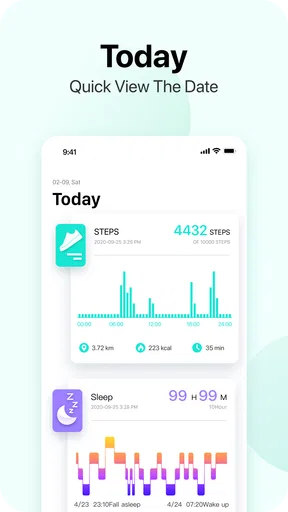
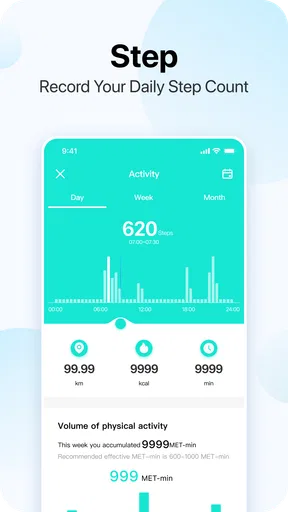
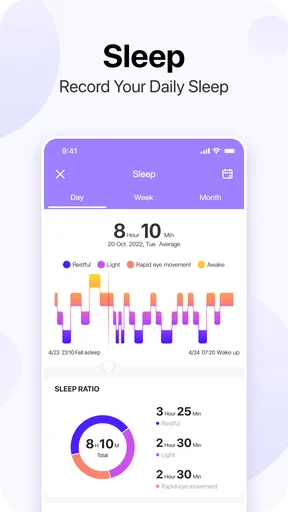
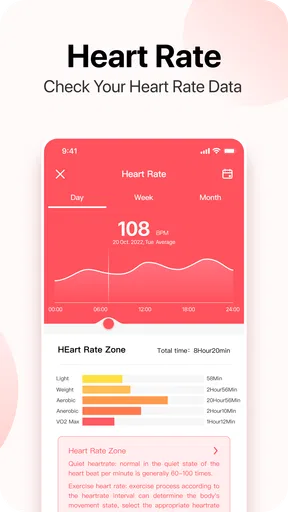
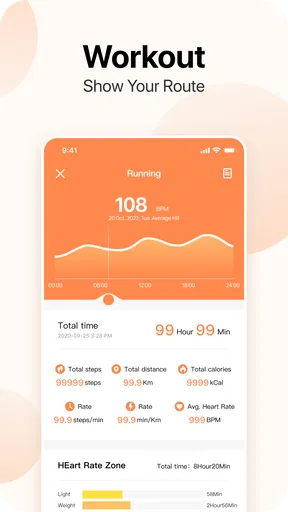
The app packs a punch with features that cater to both fitness enthusiasts and those just wanting to keep tabs on their health. From step counting to heart rate monitoring, it does the job quite well. One feature I found particularly nifty is the sleep tracking. It's quite insightful to see how well you've actually slept, even if your smartwatch sometimes tells you what you already suspect: "You need more rest!"
Notifications are another big win. Syncing your phone's notifications means you don't have to constantly check your phone. Whether it's a WhatsApp message or a calendar reminder, the app keeps you in the loop without being intrusive.
Usability and Interface
Now, let's talk about the user interface. It's simple, clean, and doesn't overwhelm you with too much information. Everything is organized into neat little sections, making navigation as easy as pie. The app does a good job of balancing functionality with user-friendliness.
"It's like having a mini dashboard on your wrist," a friend exclaimed when I showed them the app.
And I couldn't agree more. Whether you're a tech novice or a seasoned pro, you'll find it intuitive and easy to use.
Sync and Connectivity
Connectivity is another area where Da Fit shines. It maintains a stable connection with your smartwatch, ensuring your data stays up-to-date. I did notice that occasionally the sync would lag, especially if the app wasn't running in the background. But overall, it was reliable enough to not be a deal-breaker.
Worth Reading Before You Choose

Baby Panda World Brings Quick Play to Modern Phones, but Its Game Library Feels Busy

ESPN’s Live Game View Makes Following Close Games Easier

QuizzLand Review: A Good Fit for Short Trivia Breaks, Not Every Player

Basketball Stars: Multiplayer Is Fast, but Can It Recover When Matches Go Wrong?

WEBTOON Turns Phone Updates Into a Better Reading Routine

Link to Windows Runs on Shared Habits, Not Social Feeds
It also supports multiple device connections, which is a plus if you're someone who likes to switch things up between different gadgets.
Final Thoughts
In a world where everything's getting smarter, the Da Fit app offers a convenient way to stay in control of your fitness and daily notifications. It's not perfect, but it doesn't have to be. What it offers is a solid performance that fits seamlessly into your lifestyle. If you're looking for an app that enhances your smartwatch experience without a steep learning curve, give Da Fit a shot. It might just be the companion you didn't know you needed.
Pros
- User-friendly interface and easy navigation.
- Wide range of customizable watch faces.
- Accurate fitness tracking and metrics.
- Seamless syncing with other devices.
- Long battery life for extended use.
Cons
- Limited third-party app integrations.
- Occasional syncing issues reported.
- Basic notification management options.
- Some features require in-app purchases.
- Limited compatibility with older devices.
FAQs for Da Fit
What is Da Fit and what are its main features?
Da Fit is a comprehensive fitness tracking app designed to work seamlessly with compatible smartwatches and fitness trackers. Its main features include real-time monitoring of heart rate, steps, sleep patterns, and exercise routines. The app also offers personalized health insights, workout history, and notifications, making it a versatile tool for health enthusiasts.
Is Da Fit compatible with all smartwatches?
Da Fit is compatible with a wide range of smartwatches, particularly those from lesser-known brands. However, it may not support some high-end devices like Apple Watch or Samsung Galaxy Watch. It's essential to check the compatibility list on the app’s official page or your smartwatch’s specifications before downloading.
How does Da Fit handle data privacy and security?
Da Fit prioritizes user privacy and data security by implementing encryption and secure data storage practices. The app requires minimal permissions and does not share personal data with third parties without user consent. Users can review its privacy policy within the app to understand how their data is managed.
Can I customize notifications and alerts in Da Fit?
Yes, Da Fit allows users to customize notifications and alerts according to their preferences. Users can set reminders for hydration, medication, or activity, and receive alerts for calls, messages, and social media updates. Customization options are accessible through the app’s settings menu, providing flexibility in managing alerts.
Does Da Fit offer integration with other health and fitness apps?
Da Fit supports integration with popular health and fitness apps like Google Fit and Apple Health. This allows users to sync their data across platforms for a holistic view of their fitness journey. However, integration capabilities may vary based on the device and operating system, so checking compatibility is advised.


